Every LLC, every check, every wire —
in one place.
Print MICR-compliant checks on blank stock, generate wire instructions, track payments across multiple LLCs, and export everything to Excel — with per-user data isolation and full audit logging.
Print real checks on blank stock — scannable by any bank.
Business-format checks with MICR E13B encoding that pass mobile deposit scanners. Exact 8-characters-per-inch spacing, On-Us and Transit symbols, and absolute CSS positioning so multi-line LLC names never push fields out of alignment.
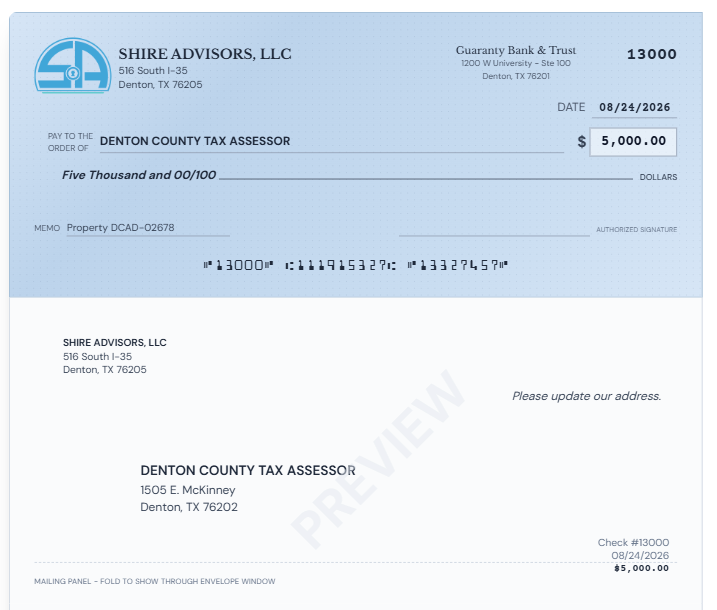
Actual check output — printed on blank stock with company logo, MICR line, and mailing panel
Upload Your Company Logo
Go to LLC Management and click the logo upload area for any LLC. Your logo appears in the top-left corner of every check — exactly where it would be on pre-printed stock. Supports PNG, JPG, and SVG.
Add Your Signature
Upload a signature image in the same LLC settings panel. It prints on the signature line of every check in dark blue ink — giving each check an authorized, professional appearance without hand-signing a stack.
Per-LLC Branding
Each LLC gets its own logo and signature. When you print a check, the system pulls the correct branding for that entity automatically — no manual switching, no mix-ups.
Your logo and signature — printed on every check.
Upload your company logo and an authorized signature image directly in LLC Management. Every check you print carries your branding exactly where it belongs — top-left for the logo, on the signature line for the signature. No pre-printed stock needed.
Designed to fold into a standard #10 envelope — every time.
Each check prints in business format: one check on top with two detachable stubs below, plus a mailing panel at the bottom. The layout is built so the payee address shows through a standard #10 window envelope after a simple tri-fold.
Print on Blank Stock
Print the full page on standard 8.5" x 11" blank check stock. The check, stubs, and mailing panel all render in their correct positions automatically.
Tri-Fold the Page
Fold the bottom third up first (bringing the mailing panel behind the check), then fold the top third down. The payee name and address on the mailing panel lines up with a standard #10 window envelope.
Insert & Mail
Slide the tri-folded check into a #10 window envelope. The payee address shows through the window — no separate label or handwriting needed. Seal and mail.
Tip: Standard #10 envelopes are 4⅛" x 9½" with a left-side window. The mailing panel on every check is pre-positioned so the payee address falls directly behind that window after a standard tri-fold. No measuring, no guessing.
Generate and print domestic wire instructions in seconds.
Create wire transfers with full originator and beneficiary details. Print-ready documents with increased text sizing for readability. Track wire status from pending to sent.
Every check and wire — filtered, sorted, and exportable.
A unified view of all payments across every LLC with powerful filtering. Toggle visibility of printed or voided items, filter by LLC or date range, and export the current view to Excel with one click.
Smart Filtering
Hide Printed, Hide Voided toggles with LLC dropdown — all state-persistent in localStorage
Date Range Filter
From/To date pickers filter the table and Excel export. Clear button to reset instantly
Excel Export
One-click .xlsx download of whatever view you're looking at — filters, LLC, date range all respected
Tabs: All / Checks / Wires
Quick-switch between combined view, checks only, or wires only with live counts
Batch Printing
Print All Pending button with confirmation modal — prints every pending check in sequence
Clickable Entities
Click any Payee, LLC, or Bank name to open a modal showing all associated transactions
Run a dozen LLCs from one login. Each user sees only their own.
Every LLC, bank, payee, check, and wire is tagged with an owner. Regular users see only their own data. Super Admins see everything. No cross-contamination, no accidental access.
Every LLC, check, wire, and payee — wired together.
Not a spreadsheet with a login screen. Every module was designed around how you actually manage checks, wires, and LLCs.
LLC Management
- Company name, address, EIN, account number
- Bank assignment via dropdown with enriched data
- Sequential check numbering per LLC
- Multi-line name support (hyphen delimiter)
- Clickable name opens transaction modal
Bank Management
- Central bank repository with routing numbers
- Two bank contacts with phone & email
- Separate inbound/outbound routing
- Nickname field for multiple accounts at same bank
- Cannot delete a bank if LLCs are using it
Payee Management
- Full address fields for check mailing panel
- Bank details for wire transfers
- Associate payees with multiple LLCs
- Excel import/export (.xlsx via openpyxl)
- 1099 tracking and email column
Check Printing
- MICR E13B with On-Us and Transit symbols
- Blank stock & preprinted support
- Business format: check + 2 stubs
- Absolute positioning for layout stability
- Bulk print all pending checks
Wire Instructions
- Domestic wire with full originator/beneficiary
- ABA pulled live from bank records
- Auto amount-in-words calculation
- Print-optimized 14px/16px text
- Status tracking: pending → sent
Dashboard
- Summary cards: Pending, Printed, Wires, Total
- Recent Payments (printed checks + sent wires)
- LLC overview with ABA, Account, Bank Rep
- Filtered by user ownership
- Tab switching: All / Checks / Wires
Payment Register
- Combined checks + wires view
- Hide Printed / Hide Voided toggles
- LLC dropdown + Date Range filter
- One-click Excel export of current view
- Left/right navigation in detail modal
Activity Logging
- Comprehensive CRUD logging across all entities
- User, action, timestamp, and details
- Activity log page with full history
- Tracks creates, updates, deletes, prints
Backup & Restore
- Full JSON backup including user accounts
- One-click download of all data
- Restore from backup file
- Superadmin data purge option
- Configurable footer and version number
Built-in Analytics
- Pageview tracking on every navigation
- IP-based unique visitor counting
- Public summary endpoint for dashboards
- Daily, weekly, and custom day ranges
- Page-level view breakdown
Security & Access
- JWT authentication with 7-day expiry
- Role-based access: Super Admin, User
- Per-user data isolation (multi-tenancy)
- Configurable session timeout with warning
- Superadmin user management
Import & Export
- Payees: Excel import (.xlsx) with LLC matching
- Payees: Excel export of full directory
- Payments: Excel export with all filters applied
- Backup: Full JSON export of entire database
- Print: react-to-print for checks and wires
Ready to manage your checks and wires?
Log in to get started, or contact us for a demo.
Log In to Your Account